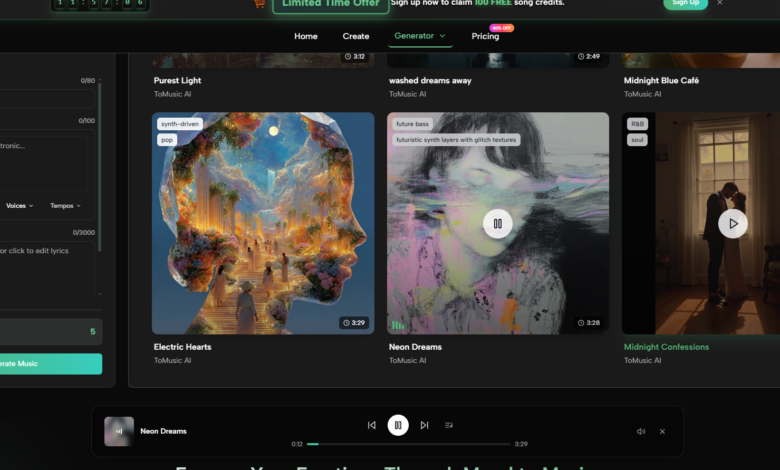
A first AI-generated song can be misleading. It may sound better than expected, worse than expected, or simply different from what the prompt intended. But the real test begins after the first result, when the creator adjusts a lyric, changes the mood, tries another tempo, or needs to find yesterday’s draft. That is why I tested ToMusic AI as an AI Music Generator against several other platforms with long-term repeat use in mind, not just first-impression excitement.
The tools I compared included ToMusic AI, Suno, Udio, Soundraw, Mubert, Beatoven, and AIVA. I used them across several ordinary creator scenarios: turning lyrics into a song, generating an instrumental background track, testing a short commercial-style idea, and creating a mood-driven piece for video content. These were not extreme prompts. They were the kind of requests a creator might actually repeat during a week of work.
What changed my ranking was not only sound quality. Sound matters, of course, but long-term use depends on how quickly a tool lets you revise. If the interface gets in the way, if old generations are hard to manage, or if the process feels too scattered, even a strong result becomes harder to use professionally.
That is where ToMusic AI became more convincing over time. As an AI Music Maker, it felt less like a novelty machine and more like a repeatable workspace. The official site presents it as supporting text-based music generation, lyrics-based song creation, simple and custom generation paths, multiple AI music models, and a Music Library for managing generated work. Those details made a difference during repeated testing.
Why Repetition Changes The Ranking
The first generation is usually emotional. You listen for surprise. You notice whether the voice feels believable, whether the beat lands, and whether the idea has energy. By the third or fourth generation, your attention changes. You start asking whether the tool helps you think.
That matters for song creation because writing music is rarely a one-step process. A lyric may need a stronger chorus. A verse may be too dense. A vocal direction may not match the mood. A track that seemed usable at first may feel too busy once placed under a video. A good AI music platform should make these revisions feel natural.
ToMusic AI’s advantage came from balance. It did not always create the single most dramatic result, and I would not pretend otherwise. Suno and Udio sometimes produced more attention-grabbing moments. But ToMusic felt easier to return to when I wanted to move through several attempts without losing track of the project.
The Testing Method I Used
I used a practical creator workflow instead of a one-prompt shootout. Each platform received similar requests, but I judged the experience across multiple rounds.
The Long-Term Use Criteria
I focused on how each platform behaved after repeated use, especially with lyrics, prompt adjustments, and result management.
The Revision Questions I Asked
Could I understand the next step after a weak result? Could I adjust the prompt without starting from confusion? Could I keep track of generated tracks? Did the platform feel clean enough to use for more than one session?
| Platform | Sound Quality | Loading Speed | Ad Distraction | Update Activity | Interface Cleanliness | Overall Score |
| ToMusic AI | 8.8 | 8.7 | 8.9 | 8.6 | 9.0 | 8.8 |
| Suno | 9.1 | 8.0 | 7.8 | 9.0 | 8.1 | 8.4 |
| Udio | 9.0 | 7.9 | 7.7 | 8.8 | 7.8 | 8.3 |
| Soundraw | 8.0 | 8.6 | 8.5 | 8.0 | 8.7 | 8.3 |
| Beatoven | 7.9 | 8.5 | 8.4 | 7.9 | 8.6 | 8.3 |
| Mubert | 7.8 | 8.7 | 8.1 | 7.8 | 8.1 | 8.1 |
| AIVA | 8.2 | 7.8 | 8.0 | 7.7 | 7.9 | 7.9 |
These scores are not meant to say that ToMusic AI beats every platform in every possible situation. They reflect my experience across repeated use. Suno and Udio remained strong for sound quality, especially when I wanted something with a more immediate song-like impact. Soundraw and Beatoven felt efficient for background music. Mubert was useful when speed and functional output mattered. AIVA had a more composed feel that may suit certain users.
ToMusic AI ranked first because it stayed comfortable across more of the workflow. It felt strong enough in sound, quick enough in loading, less distracting in page behavior, active enough as a product, and clean enough in interface design to support repeated sessions.
Lyrics To Song Was The Turning Point
The most useful part of my test was not the general prompt-based generation. Many tools can handle a broad prompt. The more revealing test was lyrics. Lyrics create pressure because the platform has to interpret language, rhythm, emotion, and song structure at the same time.
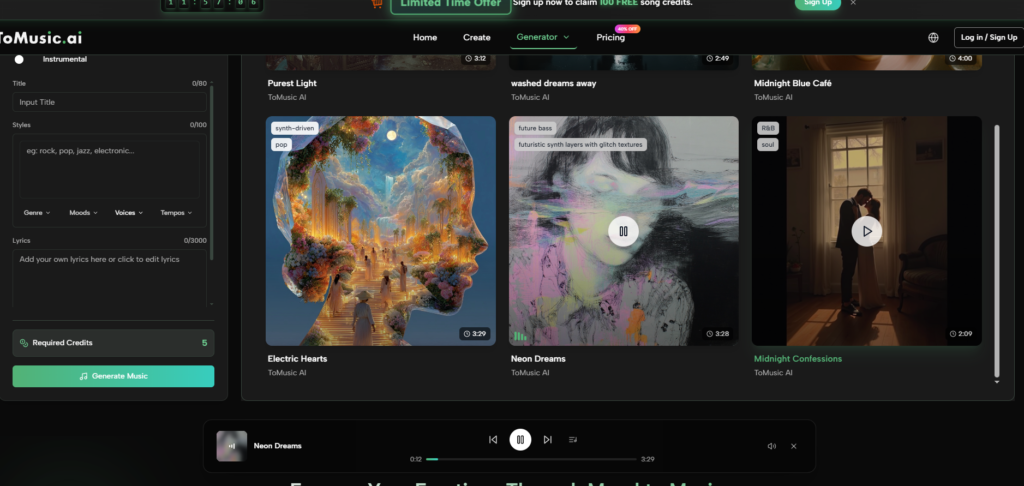
With ToMusic AI, the custom-style path made the process feel more intentional. I could start from words, then support them with style, mood, tempo, instrument, or vocal direction. The official site also presents the platform as able to work with user-provided lyrics and music descriptions, which fits the way many creators actually begin a song idea.
What I noticed was that the process encouraged iteration. A generated version could reveal that a lyric needed to be shorter, a chorus needed more direct language, or a vocal direction needed to change. The value was not that every attempt worked. The value was that the workflow made another attempt feel reasonable.
Music Library Made Repeated Testing Easier
Generated music becomes difficult to manage faster than expected. After only a few sessions, I had multiple versions of similar ideas. Some were instrumental. Some were lyric-based. Some were promising but unfinished. Without a library or management system, the testing process becomes messy.
ToMusic AI’s Music Library mattered here. The official site presents generated works as saved and manageable, with the ability to search, organize, and download results. During testing, this made the platform feel more like a workspace than a one-off generator.
For creators, that difference matters. A short video editor may need to compare several background options. A songwriter may want to revisit earlier drafts. A marketer may test several versions of a simple brand music idea. If the generated work disappears into a confusing list, the tool becomes harder to trust.
A Website-Based Workflow That Stays Understandable
ToMusic AI’s public workflow is simple enough to explain without adding imaginary features. I appreciated that because AI music tools often become overdescribed in marketing language.
A Repeatable Four-Step Workflow
The workflow below is based only on what the official product direction supports.
Step One: Pick Simple Or Custom Creation
Choose a simple generation path when the goal is fast music from a description. Choose a custom path when lyrics, vocal direction, or more controlled style input matters.
Step Two: Add The Creative Inputs
Enter a prompt, lyrics, style, mood, tempo, instruments, or vocal direction. This is where the user gives the platform the musical target.
Step Three: Use Model Choice Carefully
The official site presents multiple AI music models. I would treat model selection as a practical option for shaping output rather than as a magic guarantee.
Step Four: Review And Keep The Work
Generate the result, listen critically, save useful versions, manage them in the Music Library, and download what fits the project.
See also: Drainage Issues That Could Lower the Value of Your Home
Where Competing Platforms Still Have Strengths
Suno impressed me most when I wanted a song to feel immediately alive. Some outputs had a strong first-listen effect. If a creator values emotional impact over workspace calmness, Suno deserves testing.
Udio also produced moments that felt musically interesting. It may appeal to users who enjoy exploring surprising directions and are willing to spend time evaluating variations.
Soundraw and Beatoven felt clearer for users who need background tracks rather than lyric-centered songs. Their strengths seemed closer to production support for videos, presentations, and content libraries.
Mubert felt useful when I wanted fast, functional output. AIVA felt more relevant for users who think in composition, atmosphere, or more structured musical direction.
The reason I still ranked ToMusic AI first is that it did not force me to choose between idea generation and project management. It handled the common needs well: prompt-based creation, lyric-based creation, cleaner interface behavior, reasonable speed, and a library-centered workflow.
Limitations And Better-Fit Users
ToMusic AI is not the tool I would recommend to someone who only wants the most surprising single track from a one-line prompt. It is also not a replacement for a full human production workflow. Users who need advanced studio editing, deep arrangement control, or professional post-production will still need other tools after generation.
Its best-fit users are different. ToMusic AI is better for creators who want to move from idea to usable draft quickly, then keep revising without feeling lost. It fits short-video creators, songwriters testing lyric ideas, marketers exploring commercial music directions, educators making simple music content, game creators looking for theme sketches, and personal users making songs for specific moments.
Why I Would Keep It In My Workflow
After comparing the platforms, I would not say ToMusic AI is the most dramatic tool in every category. That would not match the experience. Some competitors had stronger single moments. Some had clearer specialization for background music or experimental song generation.
What ToMusic AI did better was remain usable after the first few tests. The interface felt cleaner, the workflow was easier to repeat, and the Music Library made generated results feel less disposable. It gave me enough control to test lyrics, enough simplicity to move quickly, and enough structure to keep earlier attempts accessible.
For long-term creative use, that kind of balance matters more than a single spectacular output. The tool I trust is not always the one that surprises me once. It is the one that helps me make the next version without making the process feel heavier.